First time using our customizer? Start here.

Module 1 gives you a full walkthrough of how to design your own wrap from start to finish using the Deviant Ink online tool. Whether you’re wrapping a sled, dirt bike, UTV, or Jet Ski, this guide will show you how to bring your vision to life.

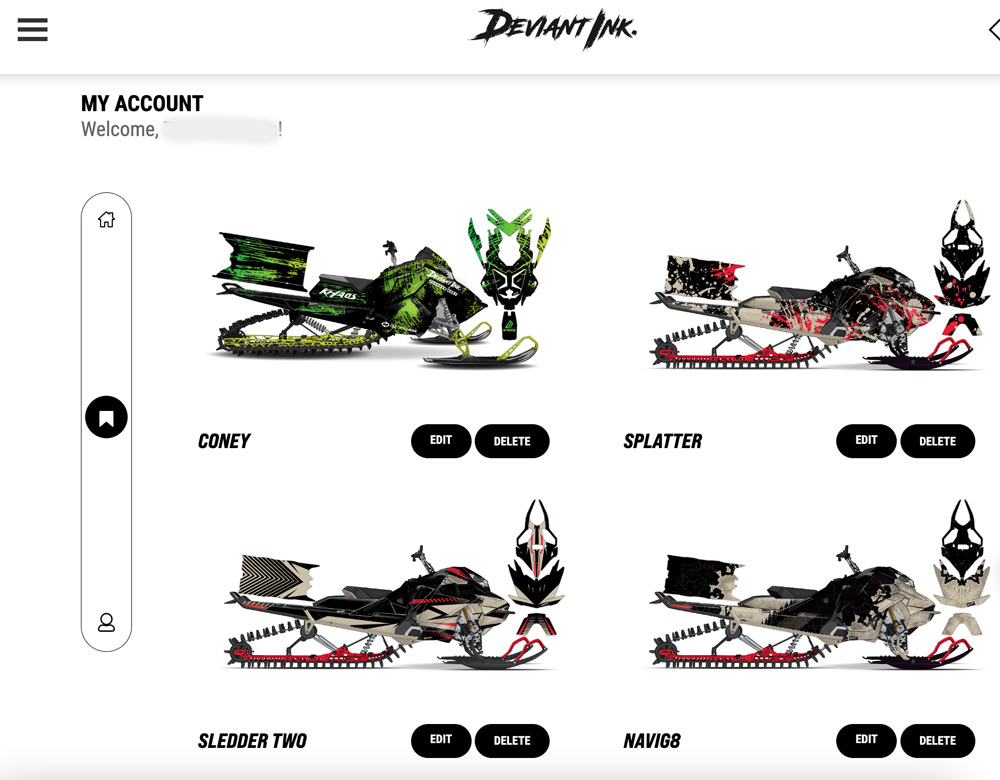
STEP 1 – CREATE YOUR FREE ACCOUNT…WHY?

  • Save your wrap builds so you don’t lose your inspiration and can come back at anytime to edit
  • Share a link of your customized wrap build to your friends via text or email.
  • Quicker checkout when you’re ready to purchase your wrap.

STEP 2 – SELECT MACHINE TYPE

Click the navigation menu in the top left corner and choose the type of machine you want to customize with a wrap.

Here’s a list of the different types of powersport machines available to wrap:

  • Snowmobiles
  • Snow bike kits
  • Sled decks
  • Dirt bikes
  • Electric dirt bikes
  • UTV’s/SxS’s
  • Jet Skis

STEP 3 – SELECT MANUFACTURER

After you’ve selected your powersports machine type, narrow it down even further by manufacturer. 

Here’s a list of the different types of powersport manufacturers available to wrap:

Snowmobiles

  • Polaris
  • Ski-Doo
  • Arctic Cat
  • Lynx
  • Yamaha


UTV

  • Polaris
  • Can-Am
  • Honda (some models)
  • Kawasaki (some models)
  • CF Moto (some models)

Dirt Bikes

  • Honda
  • KTM
  • Yamaha
  • Suzuki
  • Kawasaki
  • Husqvarna
  • Beta
  • GasGas


Electric Dirt Bikes

  • Surron
  • Talaria
  • E-Ride Pro
  • Ventus One
  • Stark Varg

Sled Decks

  • All brands, we take your deck dimensions


Snow Bikes

  • Timbersled
  • Mtn.Top
  • Yeti

Jet Skis

  • Sea Doo Spark

*A few of these may not show up as options on our website, have no fear, reach out to us via our website chat and let us know exactly what you need wrapped.

STEP 4 – SELECT CHASSIS

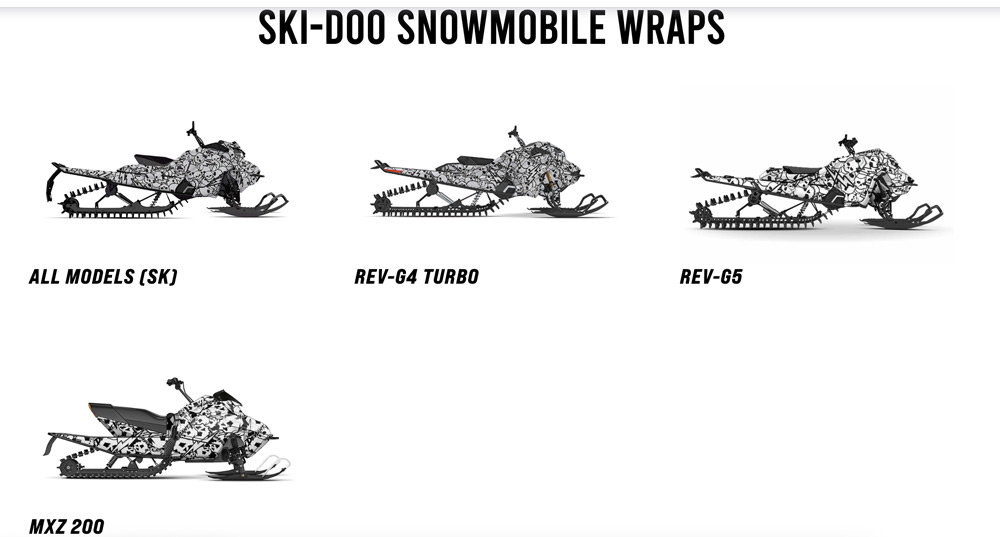
It’s now time to narrow down even further to your machine’s chassis

Notice: we may not visibly show your exact chassis within our online wrap customizer, which is okay. You will design your wrap using an available chassis and then simply select your model/year in the next step. We’ll send you a mockup to review before we print and ship. That mockup will be on your exact chassis. 


In the example below, let’s say you have a 2015 Rev XM chassis, simply select the “ALL MODELS (SK)” option below and design away.

STEP 5 – BROWSE DESIGNS

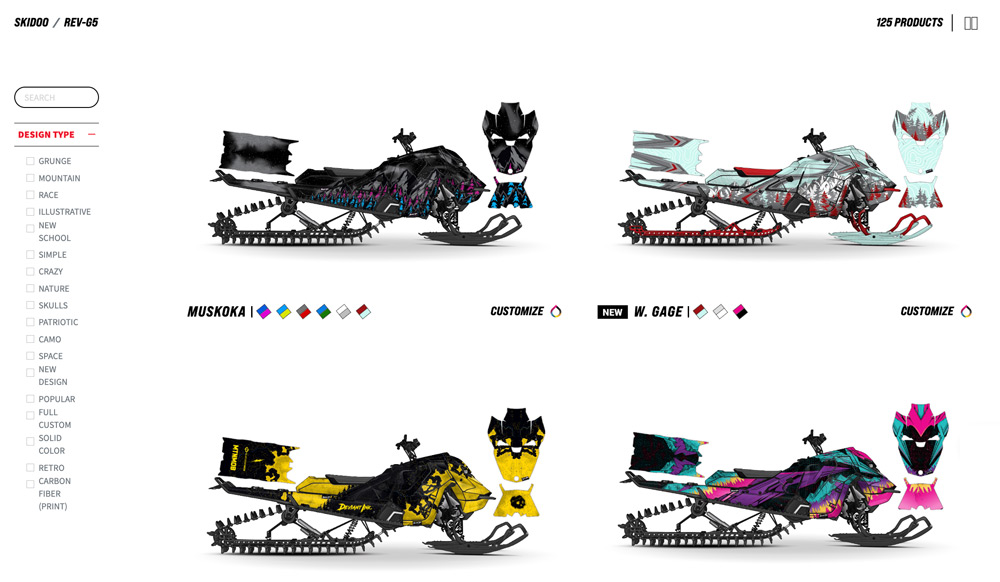
We’ll continue using Ski-Doo as the example and will select the Gen 5 chassis. As you can see with the image below, depending on the manufacturer there could be 125+ different designs.

As you scroll down through these designs, take notice:


  • You can click on the color swatches to see predefined colorways

Each design has the “CUSTOMIZE” button, which will take you into our online wrap customizer tool where you can:


  • customize all colors
  • drag and drop logos
  • upload your own logos
  • add personalization text (nickname, registration #, etc.)

STEP 6 – CUSTOMIZE YOUR WRAP DESIGN


Okay, okay. Here’s where the fun begins.
 
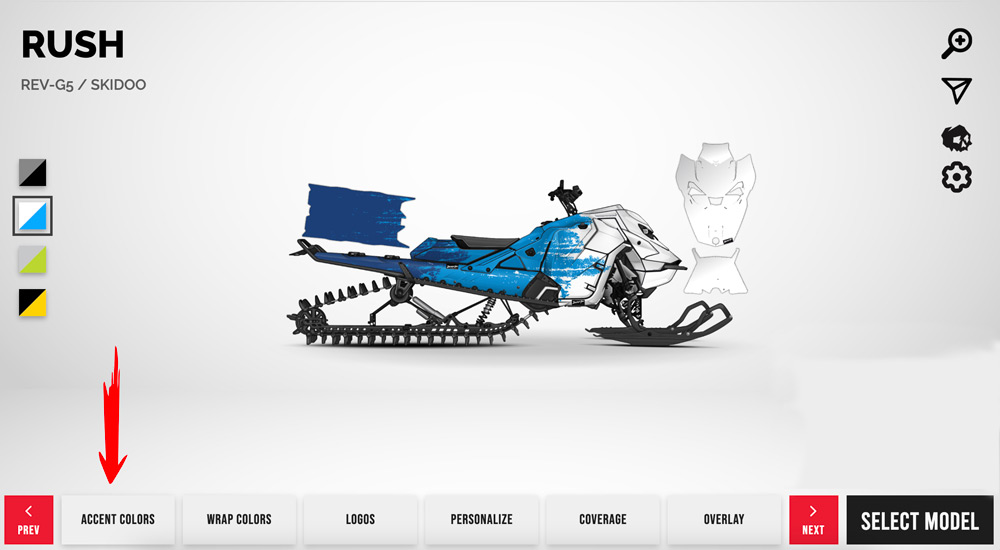
Now that you’re in the customizer tool, you’ll notice the action buttons at the bottom of the page.
 
 
Here is where you can:
 
  • Adjust the accent colors to closely match those of your current machine
  • Customize the wrap design colors
  • Add logos to your design
  • Add personalization text to your design
  • Select your wrap coverage
  • Select your overlay vinyl finish
  • Select your exact year/model

accent colors

We can closely match your accents, plastics, ski tips, rails, and more to provide the most accurate preview of how your wrap design will look on your machine.

DESIGN TIP:

Strongly consider the colors of your plastics when designing your wrap colors.
 
If you have red plastics, a tiny bit of that red may show in-between pieces of your wrap. If you choose wrap colors that clash with the color red, you will regret this decision later.
 
 
Fix #1: Simply sprinkle in a little bit of red into your wrap design and it will blend in your panel colors with your wrap and will look awesome!
 
 
Fix #2: Black is the cleanest, easiest color to work with when designing a wrap. It’s basically a clean slate to do whatever wrap colors you want. So, if you have the option and you know you are going to wrap your machine, just go all black! 

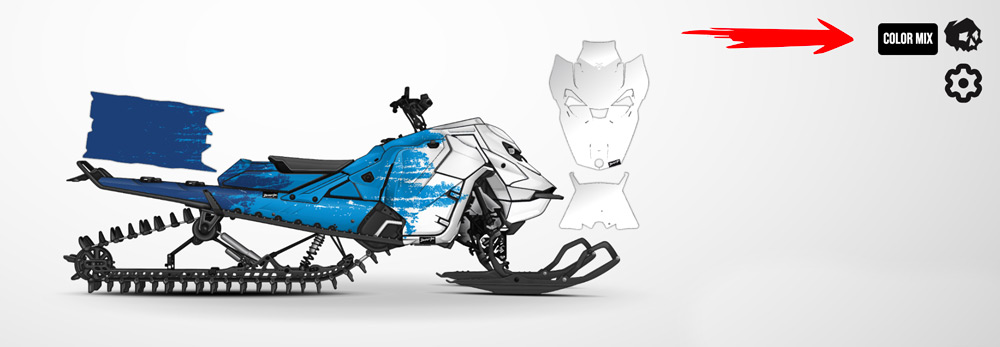
NEW FEATURE ALERT – “COLOR MIX”


What it does: Tap the color mixer icon (skull) on any design and our wrap technology will generate random colors of the wrap design you’re on.
 
When to use it: If you’re like many of us, coming up with amazing colorways on the spot can be challenging. However, when you see a colorway that stands out, you instantly recognize it. Use the color mixer as often as you need to find the wrap design inspiration you’re looking for.
 

WRAP COLORS

 
Here is where you get to customize the colors of your wrap. Most of our designs have between 3 – 5 different customizable color blocks giving.

We can get you pretty close to what your accents, plastics, ski tips, rails, etc. look like here so that you get the best most accurate presentation of what your wrap design will look like on your machine.


BUT WAIT THERE’S MORE… 🙂


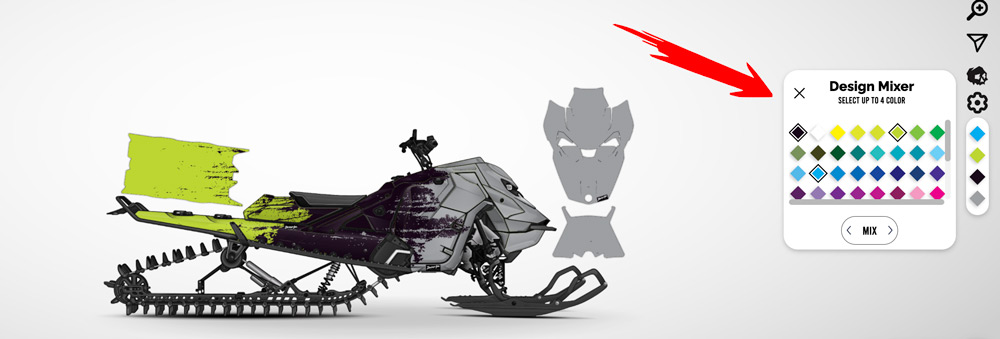
NEW FEATURE ALERT – “DESIGN MIX”


What it does: Gives you option to select up to 4 colors. So, pick the color vibes you want to see in your wrap design and our wrap technology will generate the wrap design in your preferred colors.
 
BUT IT DOESN’T STOP THERE!
 
Click the slider icons to spin up different wrap designs using your preferred colors!
 
When to use it: If you know exactly what colors you want to hit in your wrap design but aren’t exactly sure what design vibe you’re after, the Design Mixer tool will take your preferred colors, and cycle through all of our wrap designs only using your preferred colors.
 
BOOM.
 

WATCH THESE NEW TOOLS IN ACTION


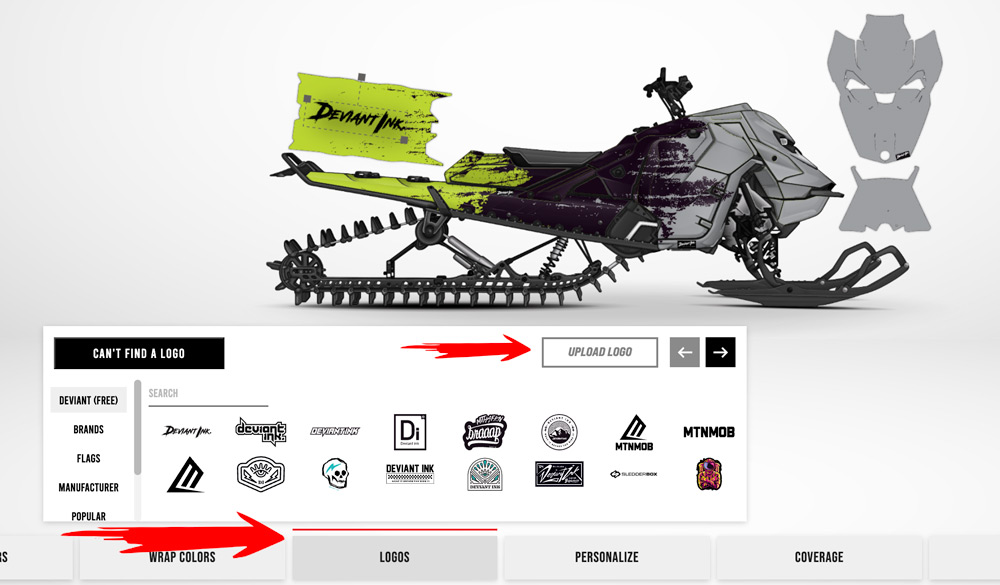
ADD LOGOS

 
Our advanced logo customizer allows you to search our database of logos, drag, drop, resize, and recolor logos to your wrap design.

If we don’t have your logo on file, no worries! Simply click the “UPLOAD LOGO” button and upload your logo. This will allow you to see what your logo will look like on your wrap design.

NOTE: We mirror your logos to the opposite side of the snowmobile.


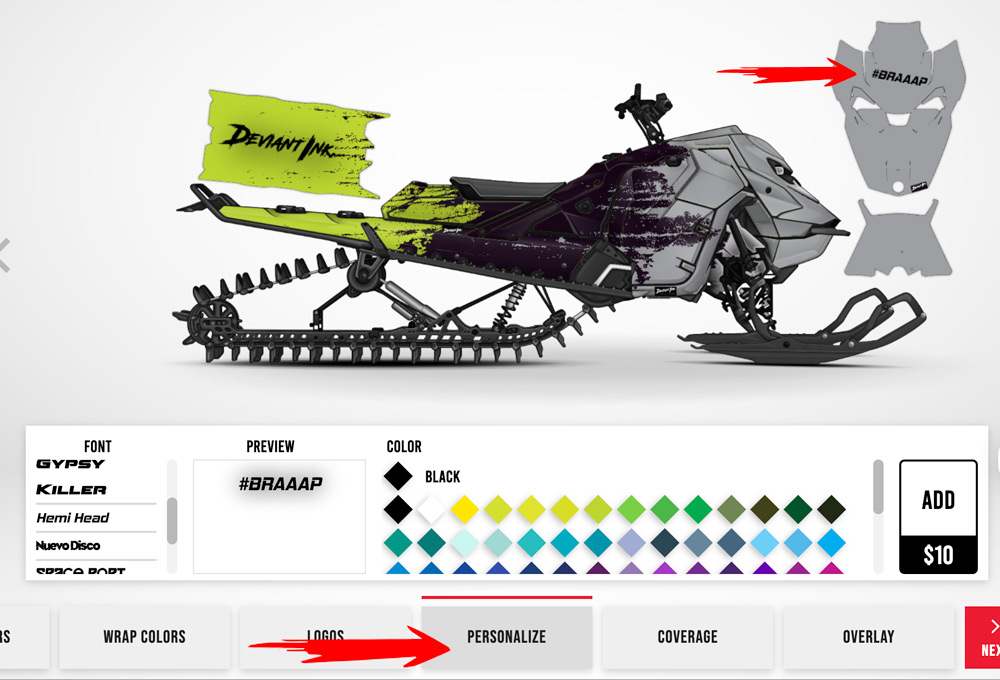
ADD PERSONALIZATION

 
Here is where you can type in any text you want and add it to your design!
 

SELECT YOUR COVERAGE

 
Here is where you can select the amount of coverage you want. In most cases, default is full coverage since that is the most popular coverage we offer.
 
But, if you only need your tunnel sides done up, all you need to do is select just that coverage.


SELECT YOUR OVERLAY

This is where you select the type of overlay vinyl finish for your wrap.

What finishes do we offer?

  • Standard matte/gloss
  • Standard gloss sparkle flake, gold flake, silver flake
  • Chrome matte
  • Chrome gloss, sparkle flake, gold flake, silver flake
  • Holographic matte
  • Holographic gloss, sparkle flake, gold flake, silver flake

>> Check out our ultimate wrap overlay finish comparison guide


SELECT YOUR MODEL/YEAR

Here is where you select your exact model and year of your machine. We’ve been doing this since 2003 so we have most templates that date back to that timeframe, but if you happen to not see your model and year, feel free to reach out to us via our website chat!
 

AND THAT’S A WRAP WITH MODULE 1

 
Module one provided an overview of the entire process, giving you a bird’s-eye view of how it all works.